Apple Declarative Device Management (DDM) is a modern approach to managing Apple devices where you define the desired configuration or state, and the device takes responsibility for applying and maintaining it. Unlike traditional MDM, which relies on the server sending commands to the device, DDM allows devices to independently apply configurations, monitor their current state, report changes, and automatically restore settings when they drift from the desired state.
With Custom Declaration (DDM) in Scalefusion, admins can deploy Apple DDM declarations using custom JSON payloads directly from the Scalefusion dashboard. This article explains how to create a custom DDM configuration for iOS/iPadOS and macOS, choose the appropriate channel and conflict resolution method, define the declaration type, and add a JSON payload.
Supported Platforms
iOS/iPadOS
macOS
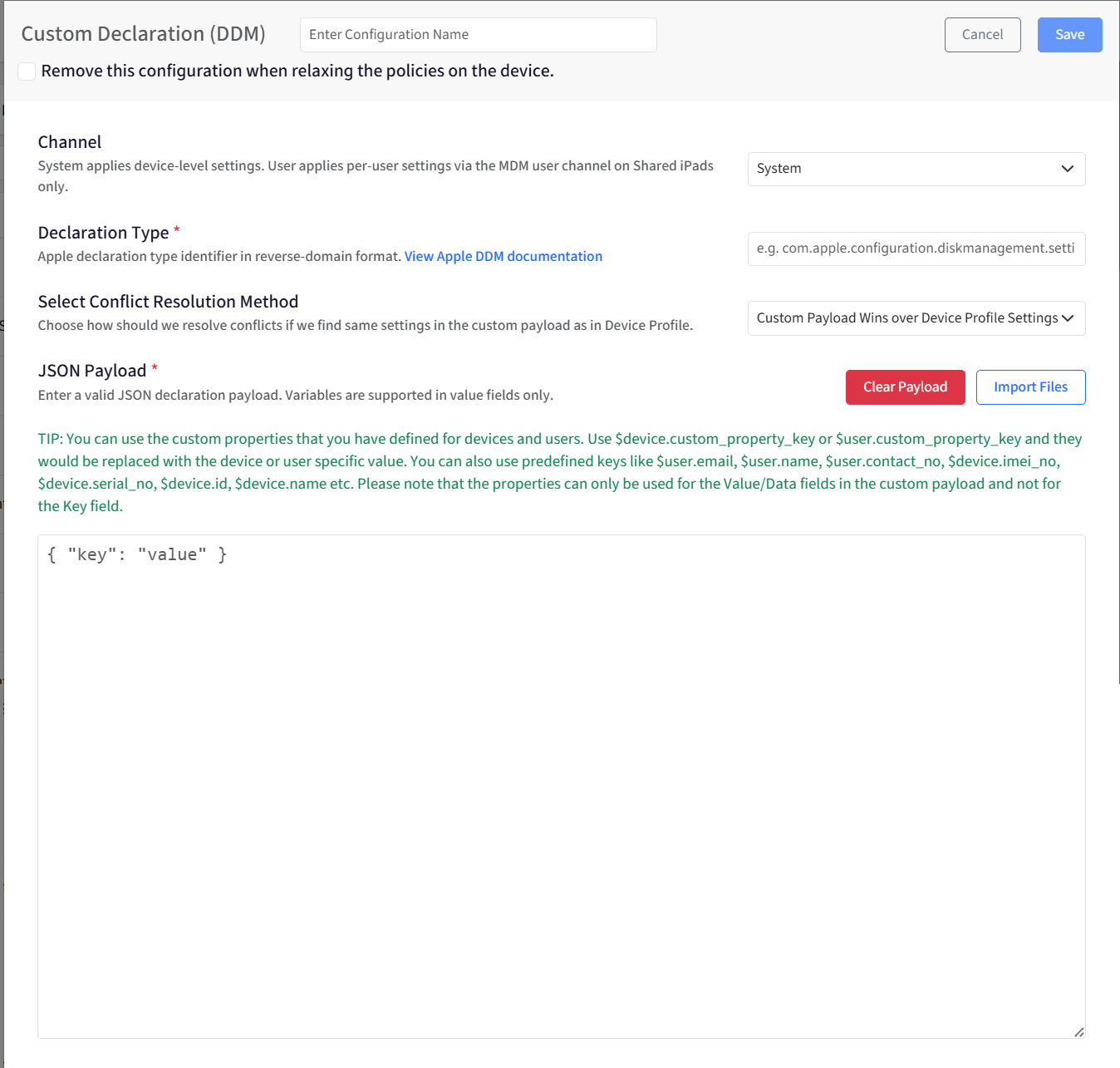
Creating the configuration
Provide a name to this configuration.
Remove this configuration when relaxing the policies on the device: When this option is enabled, the configuration will be automatically removed in the following scenarios: when policies are relaxed, or the device is unlocked via the dashboard, and when the device is deleted, all associated configurations and data will be cleared from the device.
Channel: Select the channel based on where you want the custom DDM declaration to apply:
System: Applies at the device level and is supported on iOS/iPadOS and macOS.
User: Applies at the user level and is supported on Shared iPads and macOS.
Declaration Type: Enter the Apple DDM declaration type identifier in reverse-domain format. Example: com.apple.management.properties This value specifies the type of declaration and determines the structure and settings that can be included in the declaration payload. For Apple-defined declarations, use the exact Type identifier specified in Apple’s Declarative Device Management (DDM) documentation. Do not create or modify the identifier.
Select Conflict Resolution Method: This setting determines how Scalefusion handles conflicts when the same setting exists in both the custom payload and the device profile.
Custom Payload Wins Over Device Profile Settings: Any setting defined in the custom payload will supersede the one configured in the device profile.
Device Profile Wins Over Custom Payload: When a setting is present in both the device profile and the custom payload, the device profile setting is enforced. The custom payload is still delivered, but the profile configuration takes priority. This helps avoid ambiguity when overlapping configurations are applied.
JSON Payload: Enter a valid JSON payload for your custom DDM declaration. You can also:
Import Files: Upload a
.jsonfile to populate the editor.Clear Payload: Removes the current JSON payload.
You can use device and user properties in Value/Data fields. Variables are replaced with the corresponding device- or user-specific value when the declaration is processed. Examples:
Custom properties:
$device.custom_property_key,$user.custom_property_keyPredefined properties:
$user.email,$user.name,$device.serial_no,$device.id,$device.name
Note: Variables can be used only in Value/Data fields, not in JSON Key fields.
The payload cannot be empty.
The payload must be valid JSON. If there is an error, the editor shows the affected line and an error description.
Note:
Adding multiple payloads of the same type on the same profile can result in unexpected behaviours.