Introduction
The Platform SSO (PSSO) Extension allows administrators to configure system-level Single Sign-On, enabling:
User authentication at the macOS platform level.
Consistent identity usage across system services and apps.
Improved login experience for enterprise-managed Macs.
Please note that the Platform SSO (PSSO) Extension is available only on macOS.
Creating the configuration
Provide a name to the Configuration.

Remove this configuration when relaxing the policies on the device: When this option is enabled, the configuration will be automatically removed in the following scenarios: when policies are relaxed, or the device is unlocked via the dashboard, and when the device is deleted, all associated configurations and data will be cleared from the device.
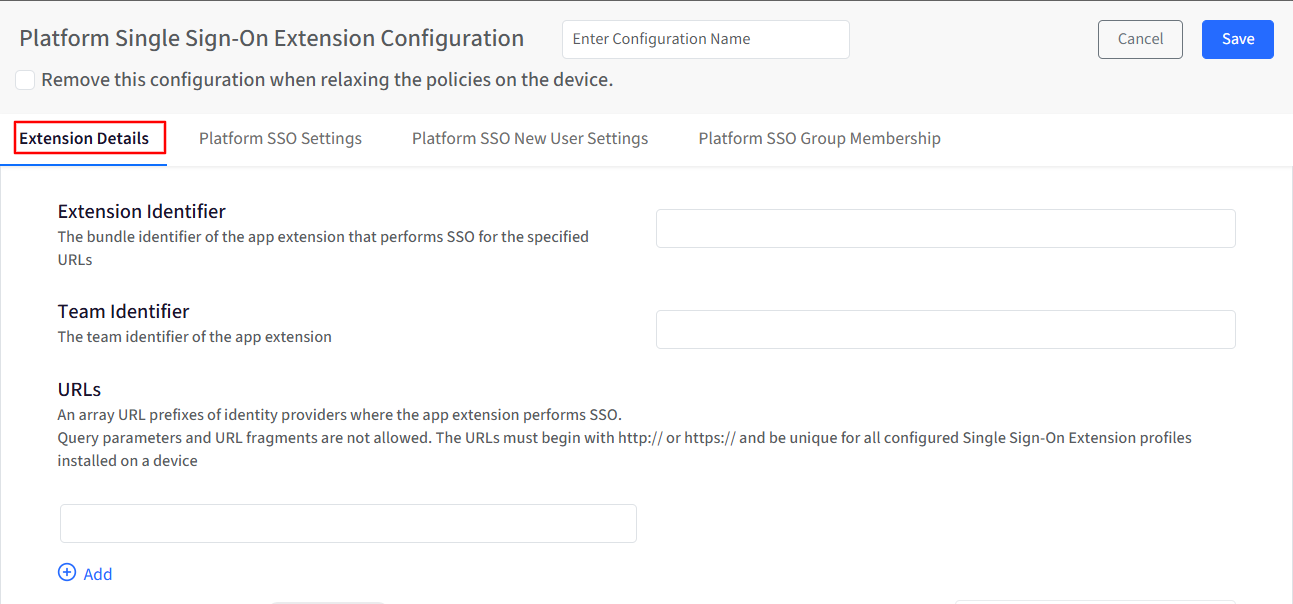
Extension Details
Extension Identifier: This field specifies the bundle identifier of the app extension that performs Single Sign-On for the configured URLs. It tells macOS which app extension should handle SSO requests.
Team Identifier: This field specifies the team identifier of the app extension. It is used along with the extension identifier to uniquely identify the SSO extension.
URLs: This field allows you to add an array of URL prefixes where the Platform SSO extension should perform authentication. Things to note:
URLs must begin with http:// or https://
Query parameters are not allowed.
URL fragments are not allowed.
Each URL must be unique across all Platform SSO profiles installed on the device.
Use Add to include multiple URLs.
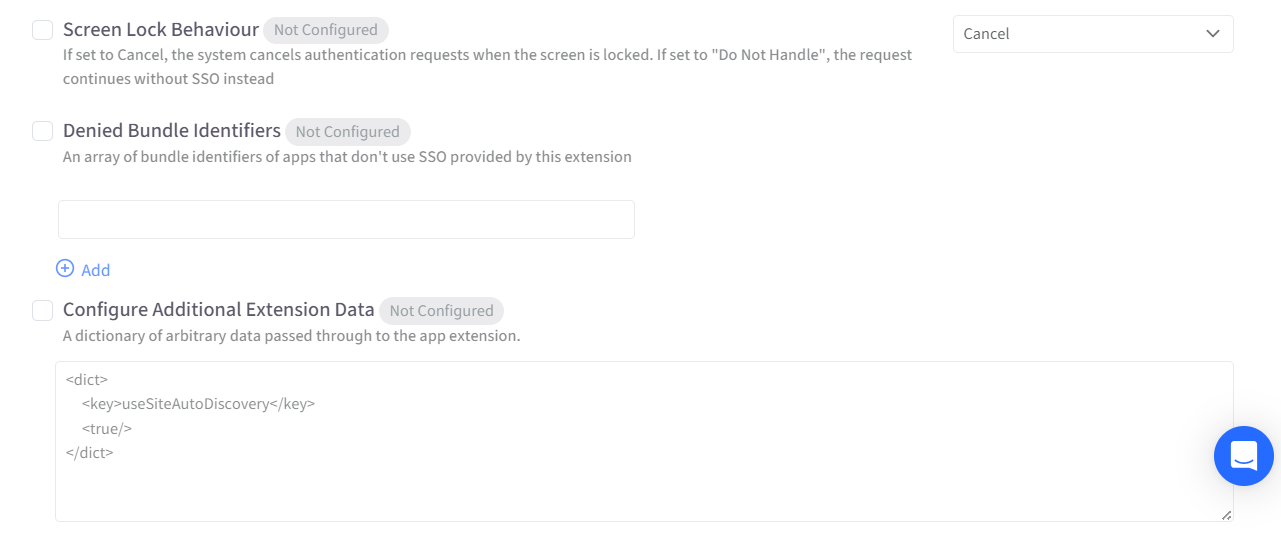
Screen Lock Behaviour: This setting controls how authentication requests are handled when the screen is locked. Available options shown in the UI are:
Cancel: The system cancels authentication requests when the screen is locked.
Do Not Handle: The authentication request continues without Platform SSO.
Denied Bundle Identifiers: This field allows you to specify an array of app bundle identifiers that should not use the SSO provided by this extension.
Apps listed here will bypass Platform SSO.
Use Add to include multiple bundle identifiers.
Configure Additional Extension Data: This option allows you to pass a dictionary of arbitrary data to the app extension.
The data is entered in dictionary (<dict>) format, as shown in the UI example.
This data is made available to the SSO extension.
Platform SSO Settings
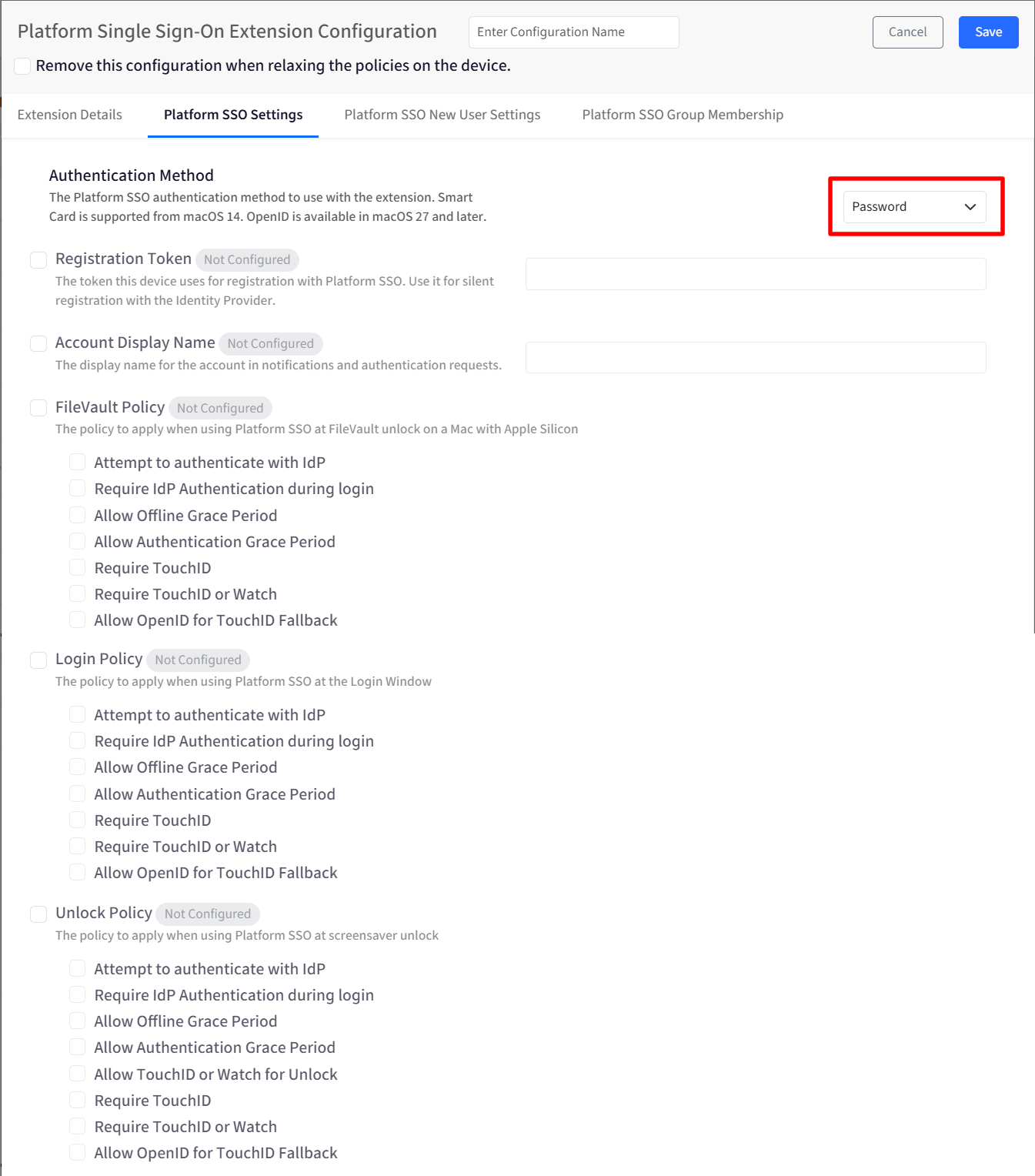
Authentication Method: This setting determines how users authenticate using Platform SSO. Depending on your environment, authentication can be performed using supported methods such as passwords or smart cards. The selected method defines how credentials are validated during login and unlock flows. Based on the selected authentication method, the other options will be available.
Password: When "Password" is selected as the authentication method, you can configure the FileVault/Login/Unlock policy.
User Secure Enclave key: When selected, you can configure FileVault/Login/Unlock policy.
When Secure Enclave Key is selected as the authentication method, FileVault Login/Unlock policies can be configured on devices running OS 27 or later.
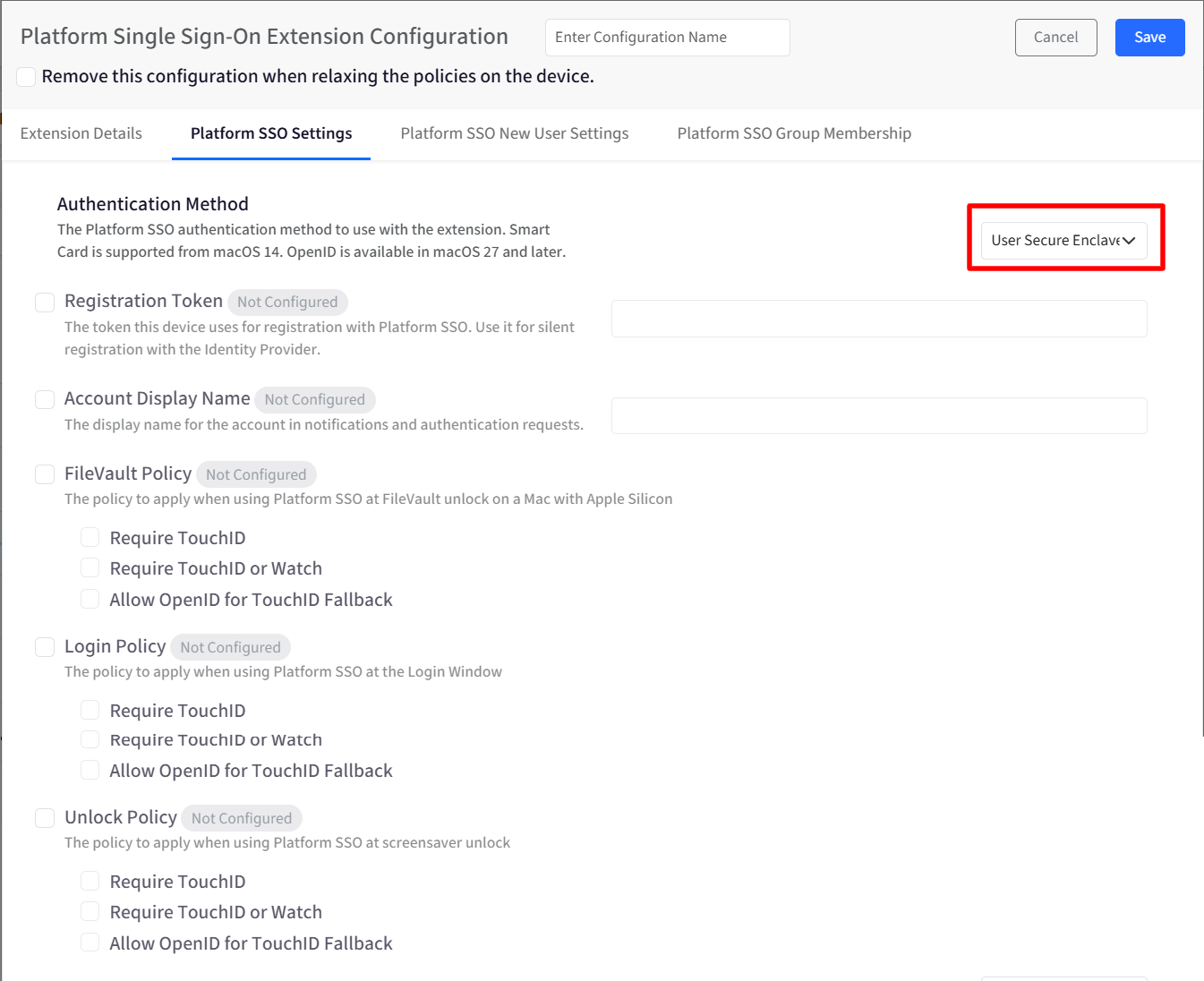
Smart card: When selected, you cannot configure FileVault/Login/Unlock policy.
OpenID: OpenID is available in macOS 27 and later.
Note:
Smart Card authentication is supported on macOS 14 and later.
OpenID is available in macOS 27 and later.
Registration Token: The registration token is used by the device to register itself with the identity provider for Platform SSO. When configured, this token enables the device to complete registration automatically, without requiring user interaction during the initial setup or sign-in process.
Account Display Name: This setting defines the display name shown for the user account when Platform SSO is in use. This helps users easily recognize their account during sign-in and authorization requests. The configured name appears in:
System notifications
Authentication prompts
FileVault authentication screens
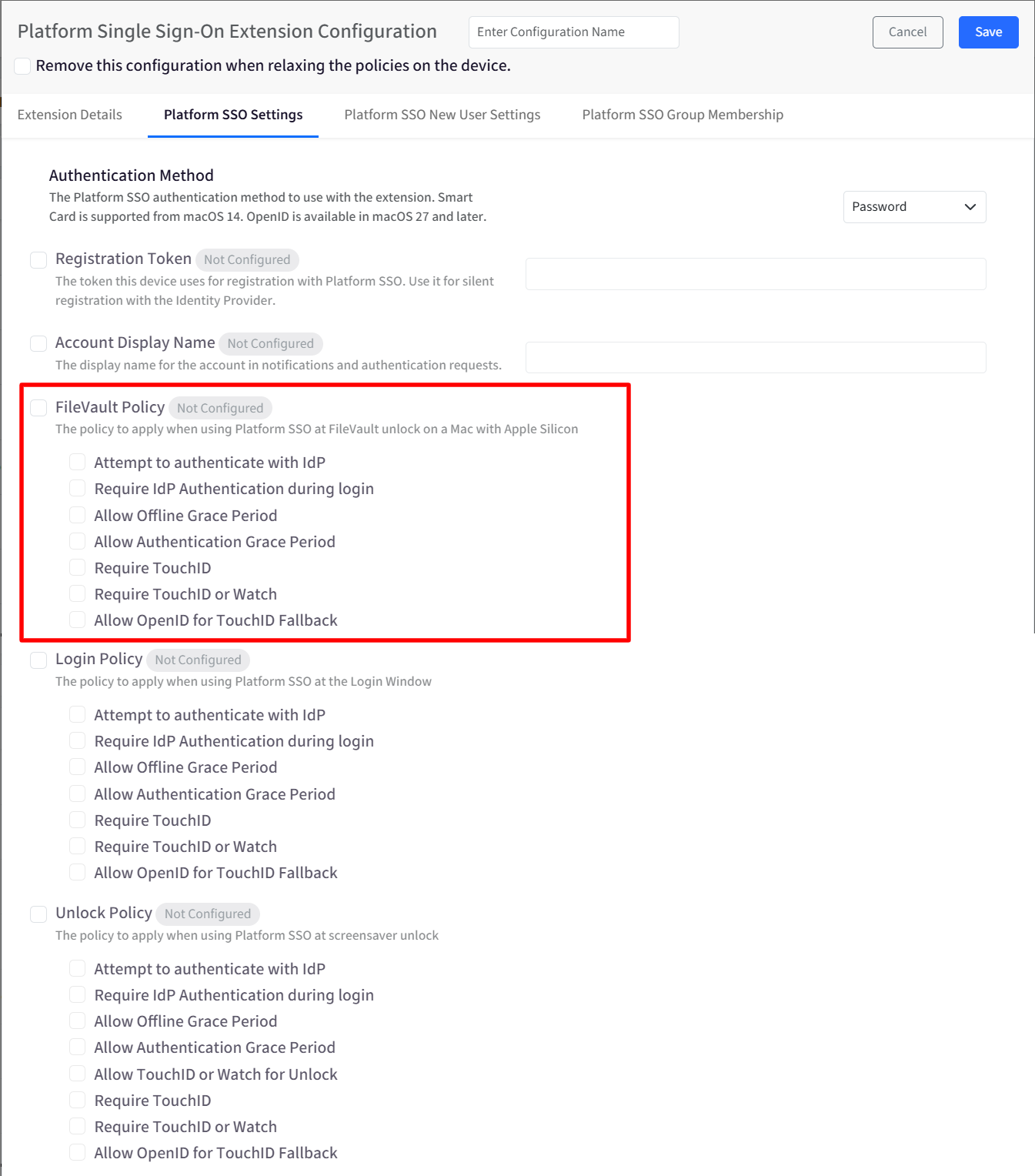
FileVault Policy: This policy controls how authentication is handled when unlocking a FileVault-encrypted Mac using Platform SSO on Apple Silicon devices.
Available options are:
Attempt to authenticate with the identity provider during login: The system tries to authenticate using Platform SSO, but may allow access if the identity provider is unavailable.
Require identity provider authentication during login: Authentication through the identity provider is mandatory to unlock FileVault.
Note:
If this option is selected device must be connected to the Internet during authentication.
Additional options are:
Allow Offline Grace Period: Permits access for a limited time when the device is offline.
Allow Authentication Grace Period: Allows temporary access without re-authenticating immediately.
Require Touch ID: The device requires the use of Touch ID (and not Apple Watch) for FileVault unlock. Available in macOS 27 and later.
Require Touch ID or Watch: The device requires the use of Touch ID or Apple Watch for FileVault unlock. Available in macOS 27 and later.
Allow OpenID for Touch ID Fallback
This option is displayed when Require Touch ID or Require Touch ID or Watch is selected.
When enabled, the device allows web login as a fallback if Touch ID fails or is not available. Available in macOS 27 and later.
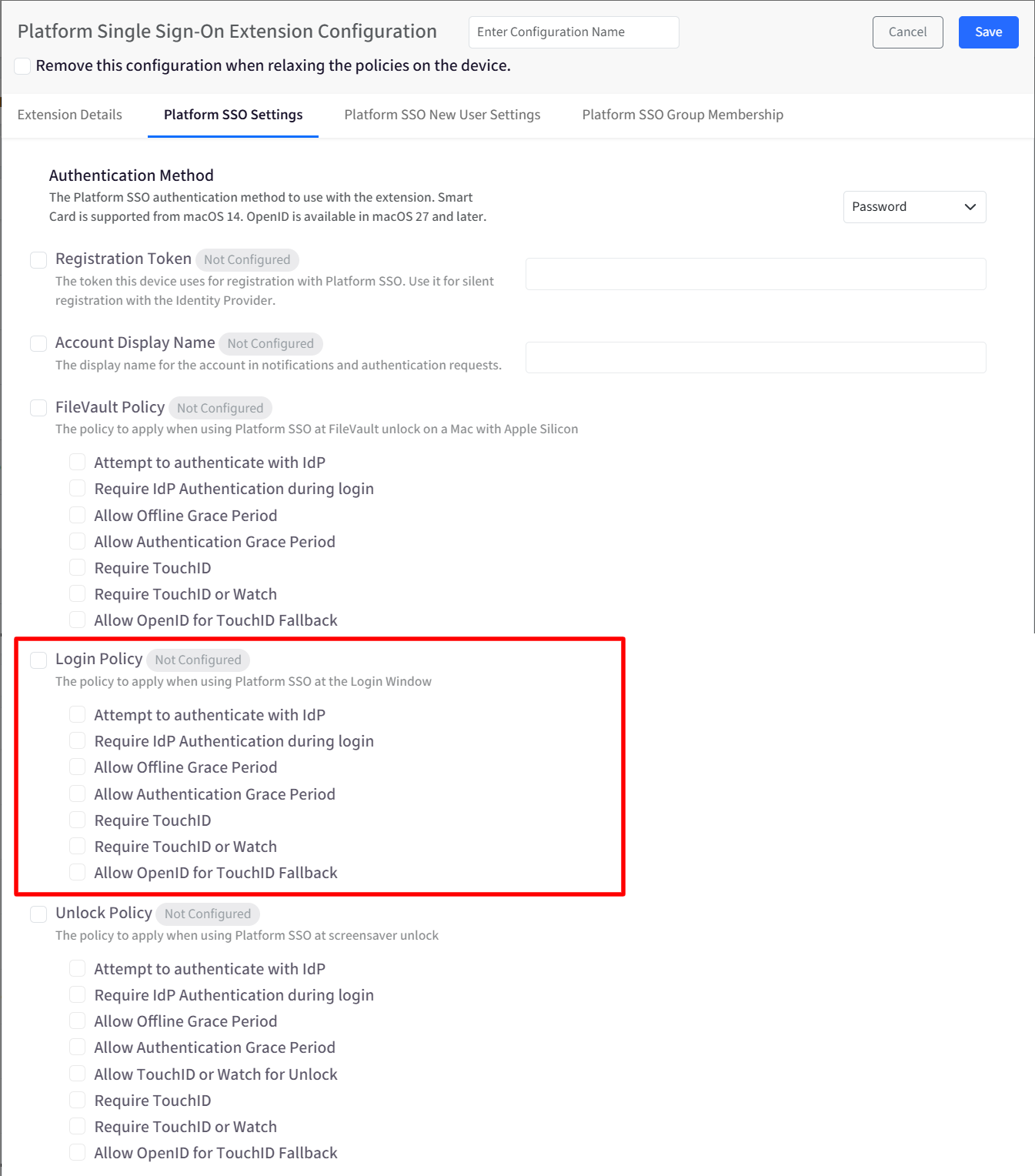
Login Policy: This setting controls how Platform SSO authentication behaves at the macOS Login Window. These settings help balance security requirements with usability, especially in environments with intermittent network access.
Available options are:
Attempt to authenticate with the identity provider during login.
Require identity provider authentication during login.
Note:
If this option is selected device must be connected to the Internet during authentication.
Additional options are:
Allow Offline Grace Period
Allow Authentication Grace Period
Require Touch ID: The device requires the use of Touch ID (and not Apple Watch) for login. Available in macOS 27 and later.
Require Touch ID or Watch: The device requires the use of Touch ID or Apple Watch for login. Available in macOS 27 and later.
Allow OpenID for Touch ID Fallback
This option is displayed when Require Touch ID or Require Touch ID or Watch is selected.
When enabled, the device allows web login as a fallback if Touch ID fails or is not available. Available in macOS 27 and later.
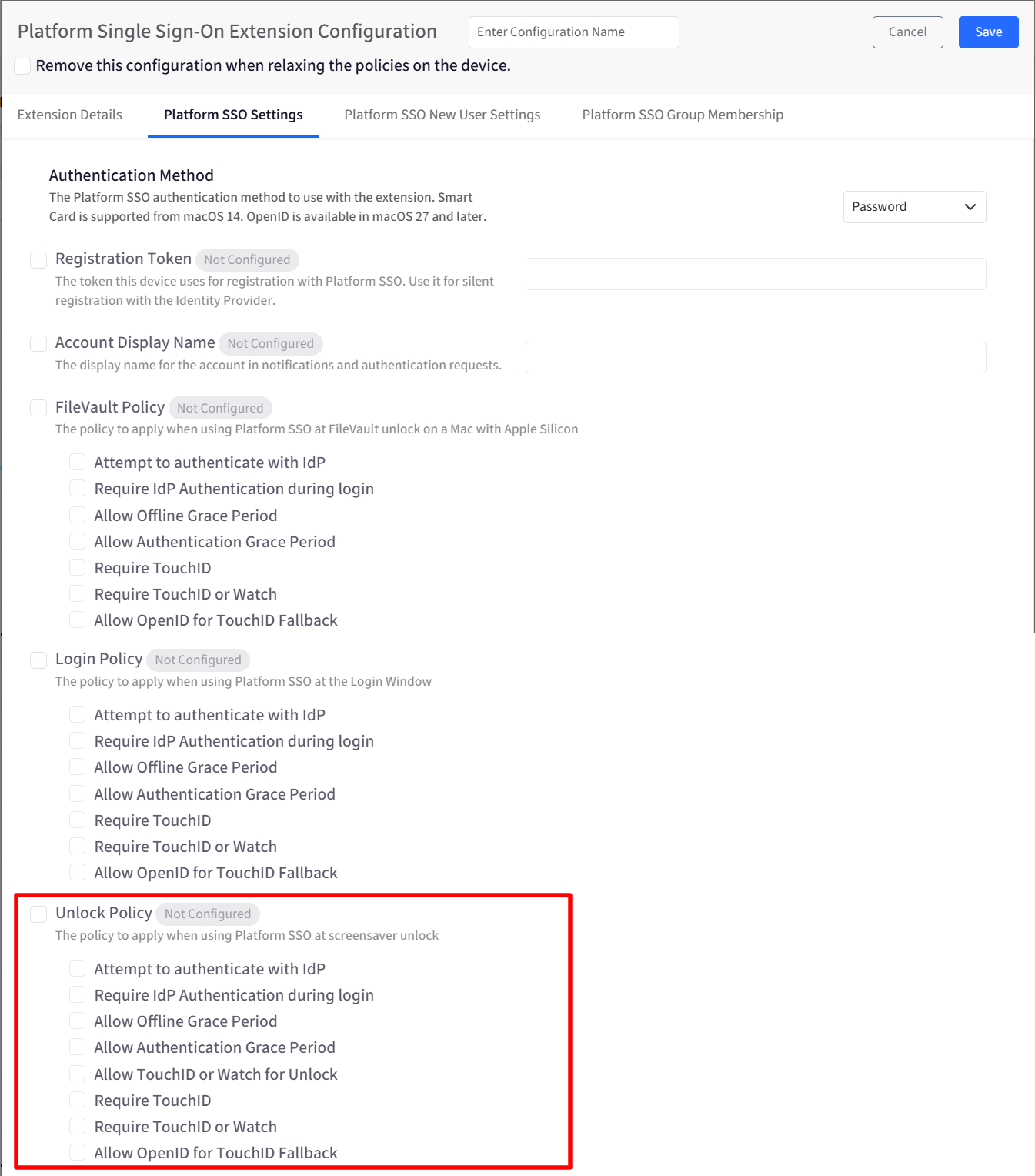
Unlock Policy: This policy applies when a user unlocks the device from the lock screen or screensaver.
Available options are:
Attempt to authenticate with the identity provider during unlock.
Require identity provider authentication during unlock.
Additional options are:
Allow Offline Grace Period
Allow Authentication Grace Period
Allow Touch ID or Watch for Unlock: Allows the use of Touch ID or Apple Watch to unlock the device.
Require Touch ID: The device requires the use of Touch ID (and not Apple Watch) for unlock. Available in macOS 27 and later.
Require Touch ID or Watch: The device requires the use of Touch ID or Apple Watch for unlock. Available in macOS 27 and later.
Allow OpenID for Touch ID Fallback
This option is displayed when Require Touch ID or Require Touch ID or Watch is selected.
When enabled, the device allows web login as a fallback if Touch ID fails or is not available. Available in macOS 27 and later.
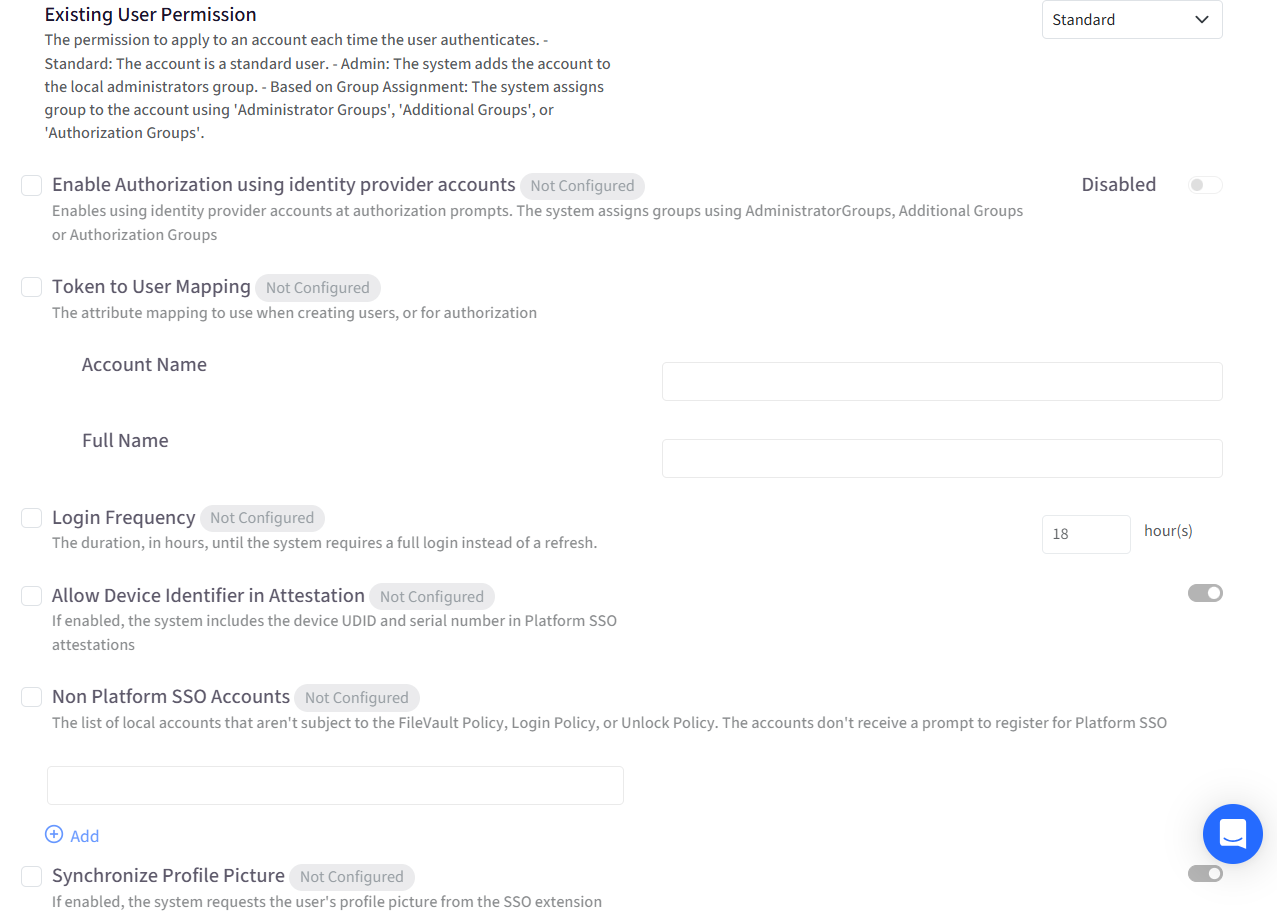
Existing User Permission: This setting defines the permission level assigned to a user account each time the user authenticates.
Available options are:
Standard: The user is assigned a standard account.
Admin: The user is granted local administrator privileges.
Based on Group Assignment – Permissions are assigned dynamically using group membership. When group-based assignment is selected, permissions can be managed using:
Administrator Groups
Additional Groups
Authorization Groups
Enable Authorization Using Identity Provider Accounts: When enabled, identity provider accounts can be used for system authorization prompts, such as actions requiring administrator approval. Authorization is granted based on group membership defined in the configuration.
Token to User Mapping: This setting defines how identity provider attributes are mapped to local macOS user properties.
Mappings used are:
When creating new user accounts
When applying authorization rules
Available fields include:
Account Name
Full Name
Login Frequency: This setting specifies how often a user must perform a full authentication. The value is defined in hours and determines when the system requires a full login instead of a credential refresh.
Allow Device Identifier in Attestation: This information can be used by the identity provider for additional validation or compliance checks. When enabled, the device includes the following identifiers in Platform SSO attestations:
Device UDID
Device serial number
Non-Platform SSO Accounts: The configured Users will not be prompted to authenticate to Platform SSO.
Synchronize Profile Picture: When enabled, the system retrieves the user’s profile picture from the SSO extension and applies it to the local macOS user account, where supported. This helps maintain consistency between identity provider profiles and local device accounts.
Sync Password from Web Login: If enabled, the system detects the password during web login and synchronizes it to the local account password for the user.
Allowed Web Login URLs: Defines the set of allowed hosts that the system can load in the Platform SSO web view. Click + Add to add a URL. Each URL entry includes a delete option. You can add up to 25 URLs. Requirements:
Each URL entry must contain a value.
Only valid URLs are allowed.
This setting is required when OpenID is selected as the authentication method.
This setting is also required when OpenID is included in the New User Authentication Method.
This setting is required when Allow OpenID for Touch ID Fallback is enabled.
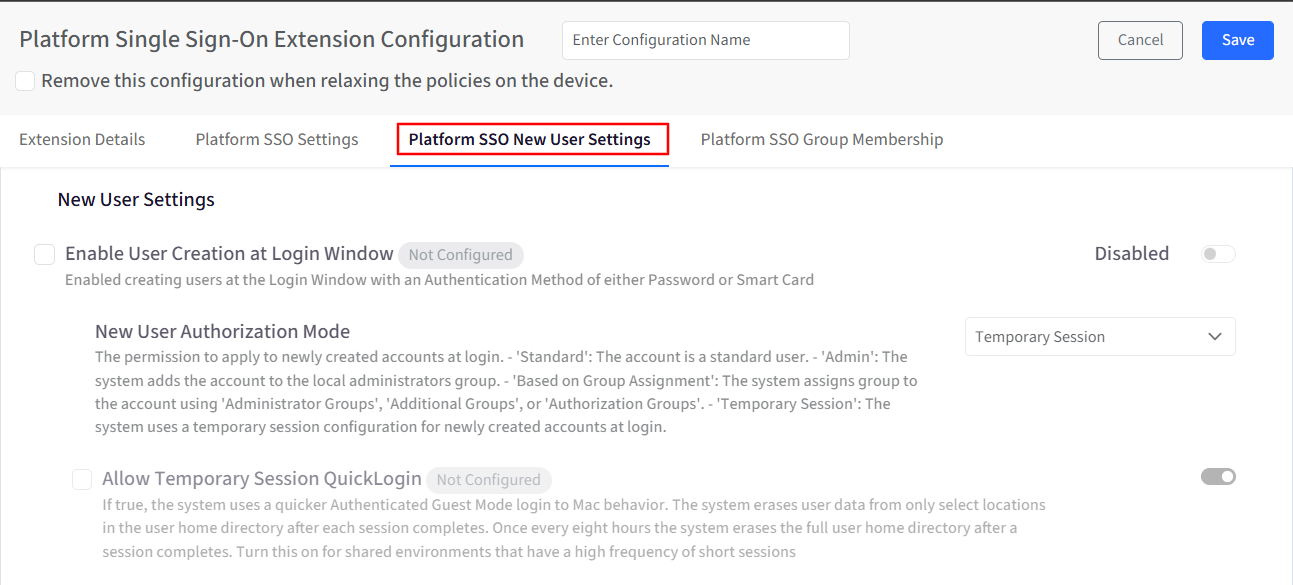
Platform SSO New User Settings
These settings control how new user accounts are created and managed using Platform SSO.
Enable User Creation at Login Window: Allows users to create new accounts directly from the macOS Login Window using supported authentication methods such as passwords or smart cards.
New User Authorization Mode: Defines the permission level assigned to newly created user accounts. Available options are:
Standard: The account is a standard user.
Admin: The system adds the account to the local administrators group.
Based on Group Assignment: The system assigns a group to the account using 'Administrator Groups', 'Additional Groups', or 'Authorization Groups'.
Temporary Session: The system uses a temporary session configuration for newly created accounts at login.
Allow Temporary Session QuickLogin: Enable this setting for shared environments with frequent short sessions. It allows the system to use a faster Authenticated Guest Mode login on Mac. After each session, user data is cleared from specific areas within the home directory. Additionally, once every eight hours, the entire user home directory is wiped following session completion.
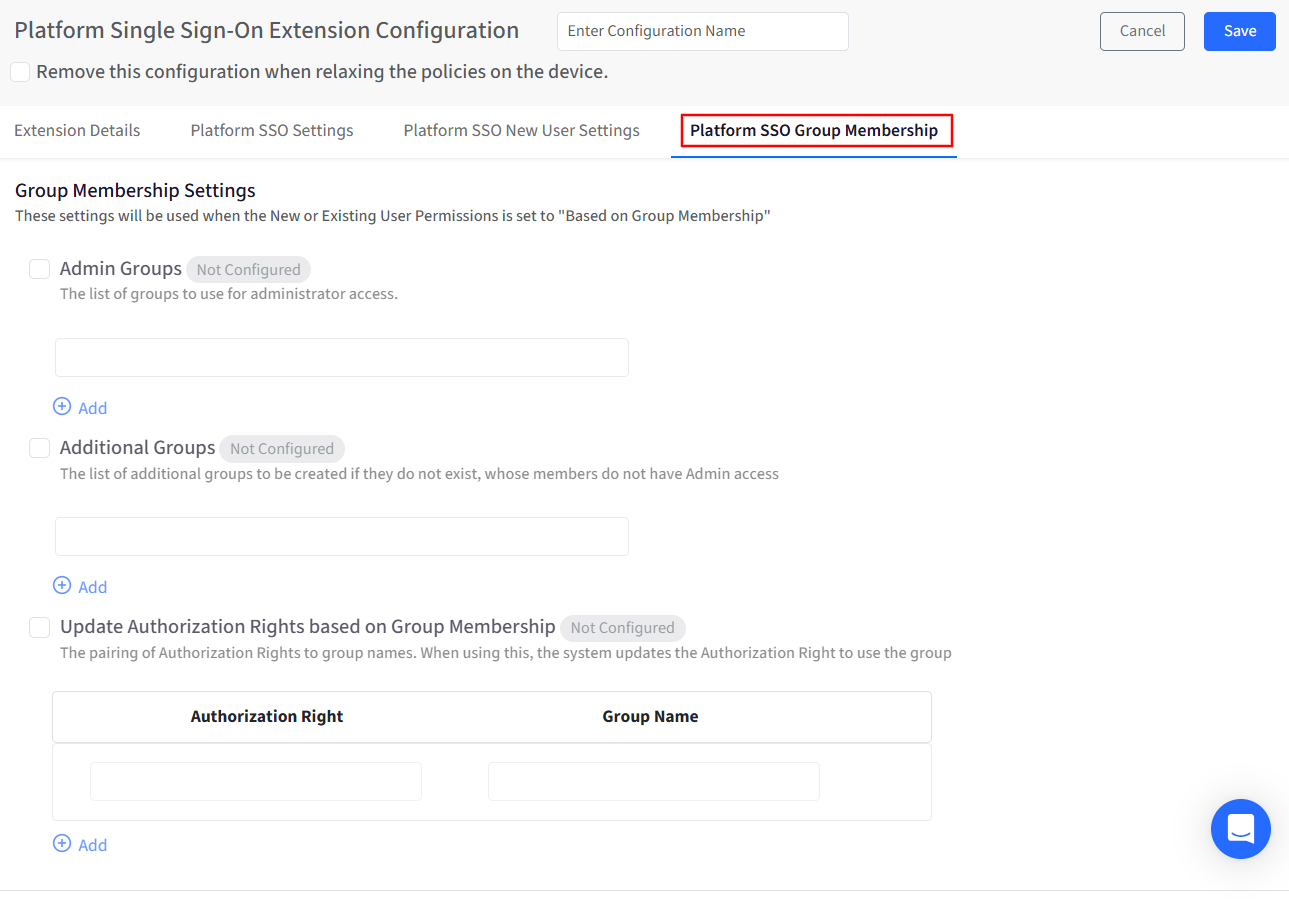
Platform SSO Group Membership
These settings control group-based permissions and authorization.
Admin Groups: Defines groups whose members are granted local administrator privileges.
Additional Groups: Defines groups that should be created automatically if they do not already exist. Members of these groups do not receive administrator privileges unless explicitly assigned.
Update Authorization Rights Based on Group Membership: Allows authorization rights to be mapped to specific group names. For each mapping:
Define the Authorization Right
Assign the corresponding Group Name
Multiple mappings can be created to support complex authorization requirements.