The following Payload helps IT Admins to restrict access to the "Find My Mac" option on Mac devices. The "Find My Mac" option is available to the user(s) when they log into their iCloud/iTunes account on a Mac.
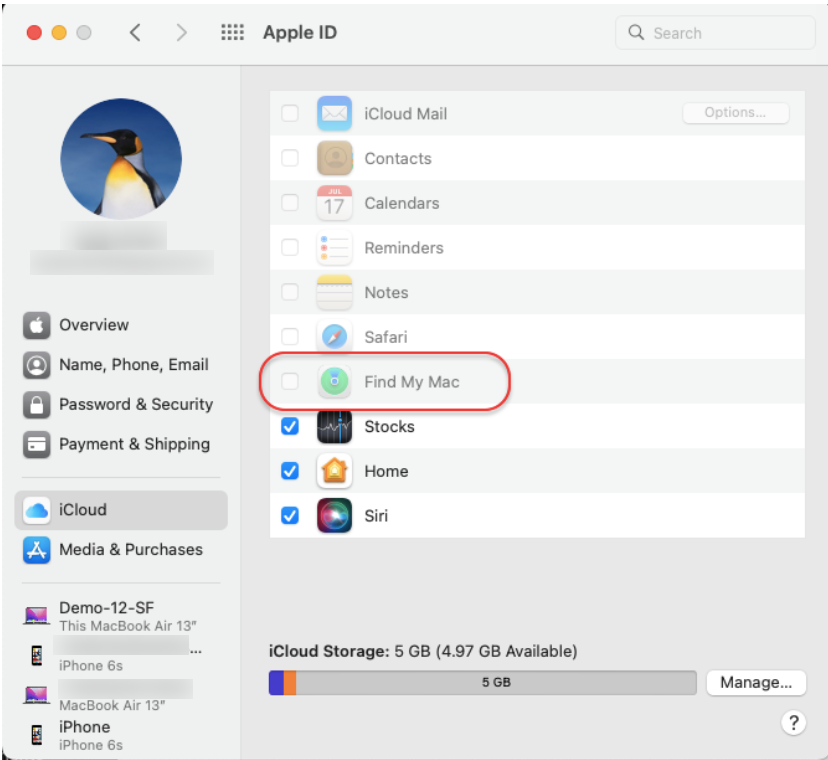
This Payload restricts the user(s) from changing the state of the "Find My Mac" option the moment they log in using Apple ID, or, in case the "Find My Mac" option is already turned on, the user will not be able to disable it.
Copy the contents below directly and add them to Apple Configurations > Custom Configurations for Mac, or click here to download the file and import it.
Follow our guide on how to add the Custom Payload in the Apple Configurations & deploy it to devices.
<?xml version="1.0" encoding="UTF-8"?>
<!DOCTYPE plist PUBLIC "-//Apple//DTD PLIST 1.0//EN" "http://www.apple.com/DTDs/PropertyList-1.0.dtd">
<plist version="1.0">
	<dict>
		<key>PayloadContent</key>
		<array>
		    <dict>
				<key>PayloadVersion</key>
				<integer>1</integer>
				<key>PayloadUUID</key>
				<string>cf420276-1fdc-4f81-8134-feb523700e1d</string>
				<key>PayloadDisplayName</key>
				<string>XYZ</string>
				<key>PayloadOrganization</key>
				<string>Scalefusion</string>
				<key>PayloadRemovalDisallowed</key>
				<false/>
				<key>PayloadType</key>
				<string>com.apple.icloud.managed</string>
				<key>PayloadIdentifier</key>
				<string>789900000</string>
				<key>DisableFMMiCloudSetting</key>
				<true/>
			</dict>
		</array>
		<key>PayloadDisplayName</key>
		<string>custom-configuration</string>
		<key>PayloadIdentifier</key>
		<string>PAYLOAD IDENTIFIER</string>
		<key>PayloadType</key>
		<string>Configuration</string>
		<key>PayloadUUID</key>
		<string>45A58F11-B3D4-4E9E-AD90-36C3C25A838B</string>
		<key>PayloadVersion</key>
		<integer>1</integer>
	</dict>
</plist>
On the device, the "Find My Mac" option will be disabled.
Notes:
The Payload and its contents are sourced from various albeit authenticated Apple Developer communities and forums.
Please validate them on a test machine before deploying them on all your managed devices.
Scalefusion has tested these Payloads, however, Scalefusion will not be responsible for any loss of data or system malfunction that may arise due to the incorrect usage of these payloads.