---
title: "Block URLs in Chrome on Mac devices"
slug: "block-urls-in-chrome-on-mac-devices"
updated: 2026-02-12T10:26:41Z
published: 2026-02-12T10:26:41Z
canonical: "help.scalefusion.com/block-urls-in-chrome-on-mac-devices"
---
> ## Documentation Index
> Fetch the complete documentation index at: https://help.scalefusion.com/llms.txt
> Use this file to discover all available pages before exploring further.
# Block URLs in Chrome on Mac devices
Choosing the Chrome browser on macOS comes with several advantages. Its clean and intuitive interface ensures a user-friendly experience, while its performance is optimized for the macOS environment. The browser's extensive library of extensions allows users to tailor their browsing experience to suit specific needs. Furthermore, Chrome's compatibility with Google services, such as Gmail and Google Drive, enhances productivity for those already embedded in the Google ecosystem, making it a popular choice among Mac device users seeking efficiency and versatility.
To make it easy for IT Admins to control website access on Chrome Browser on their managed Mac devices, the following Custom Payload helps to block access to listed websites and can be deployed to multiple devices remotely in one go.
1. Copy the contents below directly and add them to **Apple Configurations** > **Custom Configurations** for Mac, or click [**here**](https://cdn.document360.io/175c0eac-012f-4410-bdc5-ac60794f82d8/Images/Documentation/Chrome%20config%20for%20macOS.mobileconfig) to download the file and import it.
2. Follow our [**guide**](/docs/custom-configuration-ios-and-macos) on how to add the Custom Payload in the Apple Configurations & deploy it to devices.
```xml
PayloadContent
PayloadDisplayName
Google Chrome
PayloadIdentifier
com.google.Chrome.9F99EA6A-1A29-423F-91CD-94A58C46E918
PayloadType
com.google.Chrome
PayloadUUID
9F99EA6A-1A29-423F-91CD-94A58C46E918
PayloadVersion
1
URLBlocklist
https://www.example.com
example.com
PayloadDescription
Configures the block list urls for Chrome on macOS
PayloadDisplayName
Chrome config for macOS
PayloadIdentifier
com.promobitech.scalefusion.4B505397-5F71-43A6-897F-DDB6AE76D431
PayloadOrganization
Scalefusion
PayloadRemovalDisallowed
PayloadScope
System
PayloadType
Configuration
PayloadUUID
A64A4724-7351-4026-8B68-C042C46DBAAE
PayloadVersion
1
```
3. In this Payload, please change the string placeholders with the URLs that you would like to restrict. For example,
```shell
https://www.google.com
github.com
```
4. On the device, quit the Chrome application if it was already open and re-launch it. Based on the payload, the listed websites (*e.g.,* [*https://www.google.com*](https://www.google.com)*,* [*github.com*](//github.com)) will be blocked. 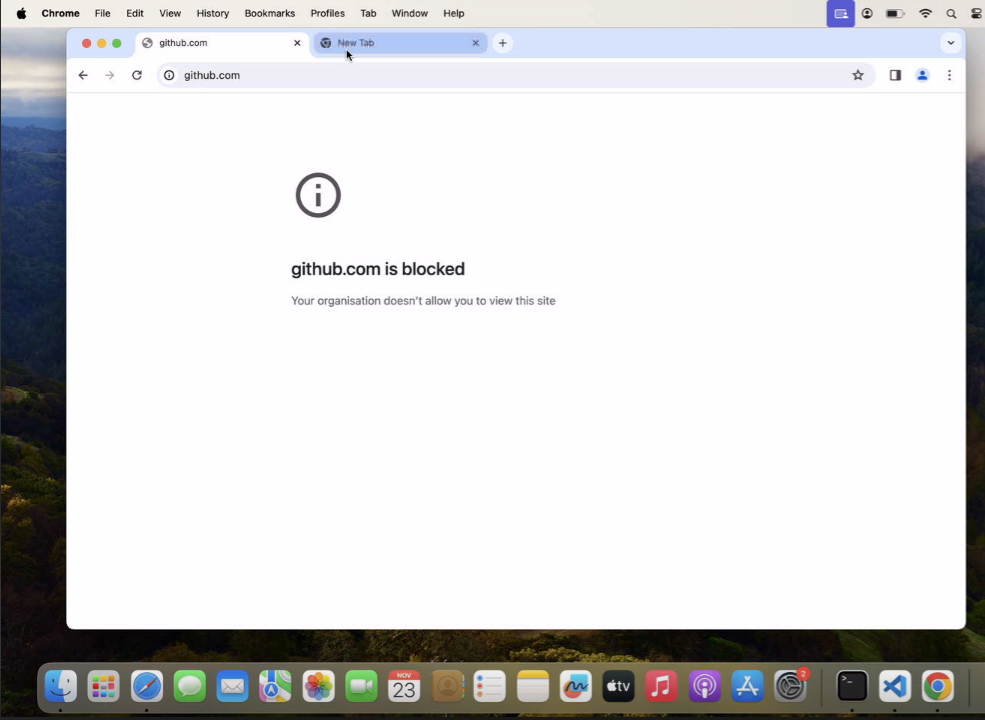
Notes:
1. The Payload and its contents are sourced from various, albeit authenticated*,* Apple Developer communities and forums.
2. Please validate them on a test machine before deploying them on all your managed devices.
3. Scalefusion has tested these Payloads; however, Scalefusion will not be responsible for any loss of data or system malfunction that may arise due to the incorrect usage of these payloads.